Overview
Fast Billing App for Odoo 17 lets retailers, wholesalers and service providers create invoices quickly with inline editing and instant totals.
Supports v 17.0 — available directly on the Odoo Apps Store.
Description
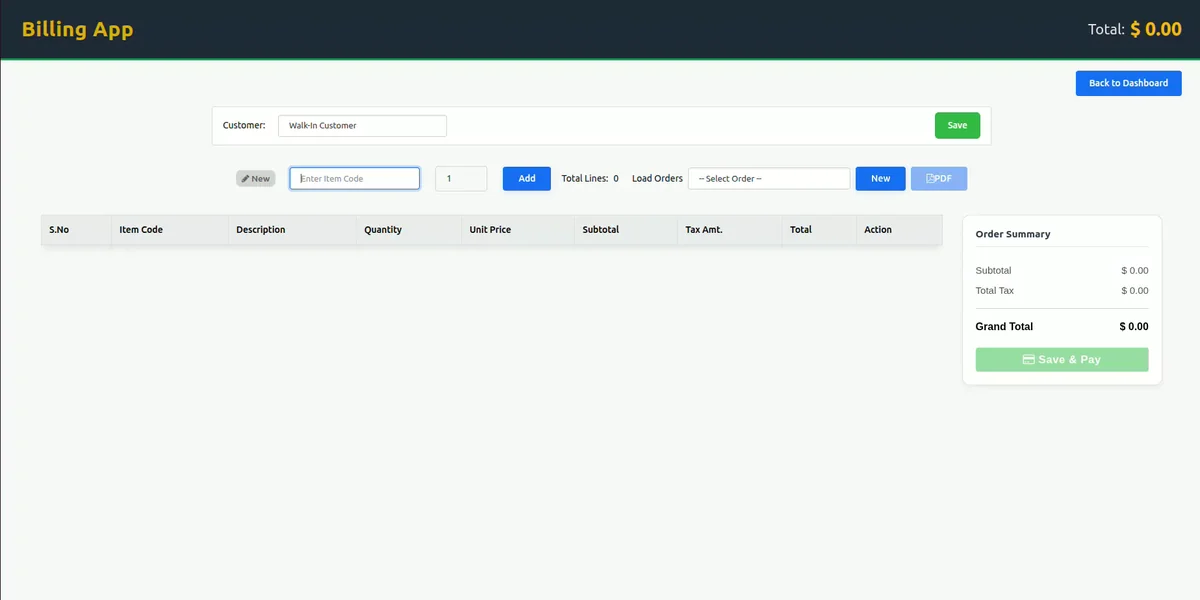
The Fast Billing App is a full-page billing interface for Odoo 17 built for businesses that need to generate invoices quickly without navigating through multiple standard Odoo screens. It is designed around a keyboard-first workflow, allowing users to type item codes, have product details fill in automatically, and edit invoice lines directly on the line instead of relying on pop-up forms. This addresses the common problem of slow, click-heavy invoicing when a business needs to process many transactions in a short amount of time, such as at a retail counter or during wholesale order processing.
Because it works alongside Odoo's existing Accounting and Invoicing modules, the Fast Billing App does not replace core financial functionality — it provides a faster front-end for creating and managing invoices while keeping data synchronized with journals and payments in the standard Odoo accounting system.
Key Features of the Fast Billing App
- Full keyboard-driven billing: type item codes or product names and move through fields using shortcuts.
- Inline editing of invoice lines: adjust quantity, unit price and descriptions directly on the line, and add or remove items without pop-ups.
- Save orders to finish later: park draft or unpaid orders and resume them later without losing entered data.
- Edit unpaid orders safely: reopen draft or unpaid invoices, modify product lines, and save without errors.
- Automatic calculation of invoice totals: subtotal, taxes, discounts and grand total recalculate automatically as line items change.
- One-click Save & Post: post and generate an invoice in a single action.
- Downloadable invoice PDFs: export paid and unpaid orders to PDF format instantly.
- Keyboard shortcuts for speed: use Ctrl + S to save, plus a Save & Post flow for immediate posting and payment.
- Access control: integrated with Odoo billing/invoicing user groups so only authorized users can create and post account moves.
- Quick Dashboard access: a dedicated button returns users to the Odoo dashboard.
- Optimized for retail and wholesale: suited to shops, distributors and service providers needing POS-like billing speed inside Odoo.
- Integrates with Odoo Accounting: invoices stay synchronized with journals, payments and financial reports.
- Lightweight performance: the interface is designed to remain responsive even under higher transaction volumes.
How the Fast Billing App Works
To use the Fast Billing App, a user must first be assigned to the Billing Access Group, which controls who can create and post invoices through this interface. Once access is granted, billing staff can open the full-page billing screen from within Invoicing and begin entering item codes or product names directly. As items are typed in, product details populate automatically, and any invoice line can be edited inline — changing quantity, price, or description without leaving the current view. Taxes, discounts, subtotals and the grand total update automatically whenever a line changes. Orders that are not yet complete can be saved and reopened later for further editing, and once ready, a single Save & Post action finalizes and posts the invoice. Paid and unpaid orders can be exported as PDF documents at any point in this process.
Business Use Cases
Retail shops that need to process a high volume of customer transactions can use the Fast Billing App to enter item codes quickly and generate invoices without extra manual clicks. Wholesalers and distributors handling bulk orders benefit from inline editing of invoice lines, allowing quantities and prices to be adjusted directly during order entry. Service providers who need to bill clients for multiple line items can save unfinished orders and return to them later, which is useful when billing details are confirmed over time rather than in a single sitting. Businesses that require documentation for both settled and outstanding invoices can rely on the PDF export feature to share paid and unpaid order records with clients or internal teams. Because access is controlled through Odoo's billing and invoicing user groups, businesses can restrict invoice creation and posting to authorized staff only, which is relevant for organizations that separate front-line billing staff from accounting approval roles.
Frequently Asked Questions
Does the Fast Billing App replace Odoo's standard Invoicing module?
No. It works alongside Odoo Accounting and Invoicing, providing a faster billing interface while keeping data synchronized with journals and payments.
Can I save an invoice and complete it later?
Yes. Draft or unpaid orders can be saved and reopened later so you can continue editing without losing previously entered data.
Can I export invoices as PDF files?
Yes. Both paid and unpaid orders can be exported to PDF directly from the app.
Who can create and post invoices using this app?
Only users assigned to the Odoo billing/invoicing access groups can create and post account moves through the Fast Billing App.
Is this app suitable for retail businesses?
The supplied module information describes it as optimized for retail shops, wholesalers, distributors and service providers that need quick, POS-like billing within Odoo.