Overview
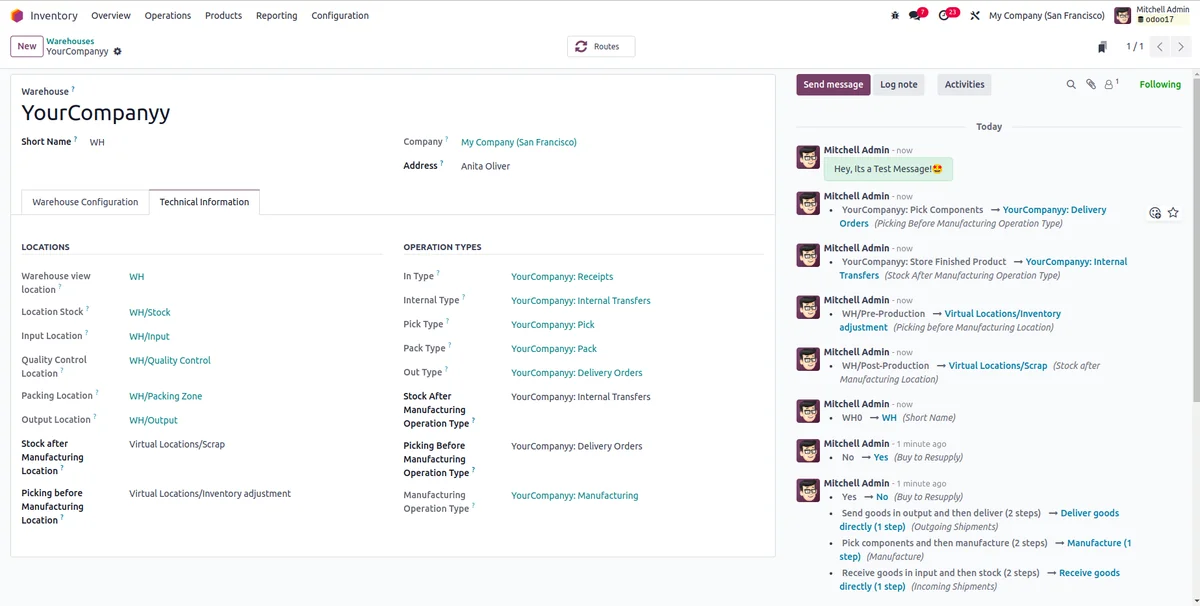
Warehouse Chatter Log adds a chatter log to the Warehouse master in Odoo, helping businesses track field-level changes on warehouse records.
Supports v 17.0 — available directly on the Odoo Apps Store.
Description
Warehouse Chatter Log is designed for businesses that need visibility into changes made to Warehouse master records in Odoo. Instead of relying on manual tracking or guesswork, this module records field-level changes directly in the chatter of the Warehouse form, giving warehouse managers and administrators a clear, in-app history of what has been modified over time.
Key Features
- Adds a chatter log specifically to the Warehouse master in Odoo.
- Logs changes made to community addons fields directly into the chatter log.
- Compatible with the Enterprise Edition in addition to the Community Edition.
- Supports custom fields, provided they are declared in the models.py file.
- Simple setup process with only installation required to activate logging.
How It Works
Once the Warehouse Chatter Log module is installed, the chatter log becomes active on the Warehouse master record. Any changes made to community addons fields on this record are automatically captured and displayed in the chatter, creating a running log of modifications. No additional configuration steps are needed beyond installation for the standard fields covered by the module.
For businesses using custom fields on the Warehouse master, these fields need to be declared in the models.py file so that the module can include them in the chatter log tracking. This ensures that both standard and custom fields can be monitored, depending on how the Warehouse model has been extended.
Business Use Cases
- Warehouse managers who need to review what changes were made to a warehouse record and when, without relying on external audit tools.
- Odoo administrators who want a straightforward way to track modifications to Warehouse master data as part of internal data governance.
- Businesses running Odoo Enterprise Edition that require the same chatter logging behavior on the Warehouse master as available in Community Edition.
- Organizations with custom fields added to the Warehouse model that want those fields included in the same chatter-based change history, after proper declaration in models.py.
Frequently Asked Questions
- Does this module work with Odoo Enterprise Edition? Yes, the Warehouse Chatter Log module is compatible with the Enterprise Edition in addition to the Community Edition.
- Will the module automatically track my custom fields? No, custom fields must be manually declared in the models.py file for them to be included in the chatter log.
- Is any configuration required after installation? The supplied module information indicates that only installation is required for the module to add the chatter log to the Warehouse master.
- Which fields are logged by default? The module logs changes to community addons fields on the Warehouse master; other fields require declaration as noted above.
- Where can I see the logged changes? Logged changes appear in the chatter section of the Warehouse master record within Odoo.